
NFC Tools - Read & Write NFC Tags Online
Scan NFC Tag
Tap below to activate live NFC scanner
More about Tapify's NFC Tools
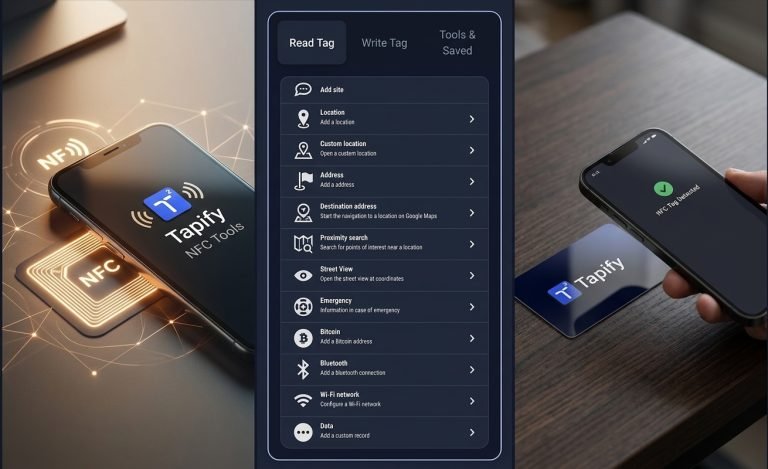
Read and write NFC tags directly from your compatible smartphone. Use Tapify NFC Tools to easily read NFC data, write new information, and test NFC tags without complicated setup.
Tapify NFC Tools makes it easy to read and write NFC tags from your compatible smartphone. Whether you’re testing an NFC card, writing a URL, or checking what’s stored on an NFC tag, you can perform common NFC tasks directly from your browser.
What Can You Do With NFC Tools?
Tapify NFC Tools lets you perform common NFC tasks quickly and easily. Depending on your device and browser capabilities, you can read information stored on NFC tags and write new data to compatible NFC tags.
Features
📖 Read NFC Tags
Read available information stored on compatible NFC tags.
✍️ Write NFC Tags
Write supported information such as URLs and text to compatible NFC tags.
🔗 Write URLs
Add a website or webpage URL to an NFC tag for quick access.
📝 Write Text
Store text information on supported NFC tags.
🧪 Test NFC Cards
Check whether your NFC card or tag can be detected and used.
📱 Smartphone Friendly
Use NFC Tools directly from a compatible smartphone and supported browser.
How to Use NFC Tools
1. Enable NFC
Make sure NFC is enabled on your compatible smartphone.
2. Choose an NFC Action
Select whether you want to read an NFC tag or write information to one.
3. Tap Your NFC Tag
Place your smartphone close to the NFC tag and follow the instructions displayed on screen.
4. Read or Write
Read the available tag information or write supported data to your NFC tag.
What Can You Write to an NFC Tag?
Depending on your NFC tag and device/browser support, you can use NFC Tools to write information such as:
- Website URLs
- Text
- Contact information
- Business links
- Social media links
- Digital profiles
- Other supported NFC records
What Is an NFC Tag?
An NFC tag is a small electronic tag that can store information and communicate with compatible smartphones using Near Field Communication technology. When a phone detects an NFC tag, it can read the information stored on it or perform an associated action.
NFC Tag Reader & Writer
Tapify combines common NFC reading and writing functions in one simple online tool. Use the NFC Tag Reader to inspect compatible tags and the NFC Tag Writer to write supported information to them.
Who Can Use NFC Tools?
This is a good SEO/use-case section.
👨💻 Developers
Test NFC functionality and compatible NFC tags.
🏪 Businesses
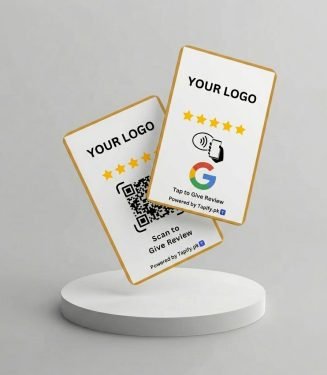
Program NFC cards with websites, business profiles, Google Reviews, and other links.
🎓 Students & Learners
Experiment with NFC technology and understand how NFC tags work.
📱 NFC Enthusiasts
Read, write, and test compatible NFC tags.
💼 NFC Card Users
Check and program NFC cards for different applications.
NFC Tools for Business
This is very important for Tapify because it connects your free tool with your actual business.
Businesses can use NFC Tools to test NFC cards and tags before using them for digital business profiles, websites, Google Reviews, menus, contact information, and other business applications.
Looking for NFC Business Cards?
Turn your NFC card into a powerful business tool with Tapify. Share your business profile, Google Reviews, social media, WhatsApp, website and more with a simple tap.
Why Use Tapify NFC Tools?
- Free to use
- Simple interface
- Read NFC tags
- Write supported NFC data
- Test NFC cards
- No complicated software
- Designed for smartphones
- Useful for personal & business applications

Frequently Asked Question
NFC Tools are utilities that allow you to interact with compatible NFC tags by reading information from them or writing supported data to them.
Yes, Tapify NFC Tools can read compatible NFC tags directly from supported smartphones and browsers without requiring a separate NFC app.
Yes, you can write supported information to compatible NFC tags using Tapify NFC Tools, provided your device and browser support NFC writing.
You can write supported records such as URLs and text. The available options may depend on your NFC tag, smartphone, and browser.
NFC capabilities vary by iPhone model, iOS version, and browser support. Use a compatible device and browser and follow the instructions provided by the tool.
Many modern Android smartphones support NFC, but functionality can vary by device, Android version, browser, and NFC hardware.
Tapify NFC Tools is designed to perform supported NFC functions through your browser, so a separate NFC app may not be required. Device and browser compatibility still applies.
Yes. You can use compatible NFC tags or cards to store supported information such as a website URL, digital business profile, or other business links.
Yes. Tapify provides NFC Tools as a free online utility for supported NFC devices and browsers.
An NFC tag reader retrieves information stored on an NFC tag, while an NFC tag writer allows supported information to be written to the tag.
 Customized Digital NFC Business Card